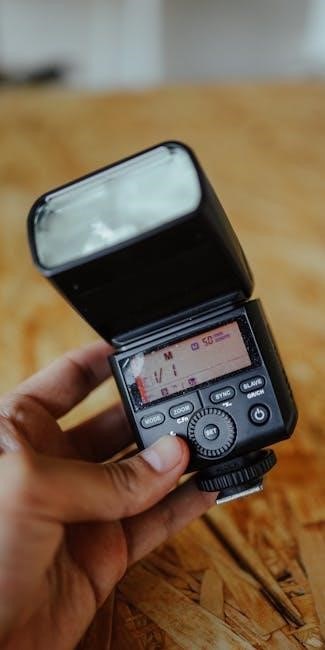
Nikon SB-700 Flash Manual: A Comprehensive Guide
This guide details the Nikon SB-700 Speedlight, covering setup, operation, CLS wireless control, and troubleshooting—ensuring optimal performance and creative lighting possibilities.
The Nikon SB-700 is a versatile and powerful Speedlight, designed to elevate your photography with its advanced features and compatibility with the Nikon Creative Lighting System (CLS). This flash unit boasts a guide number of 28/39, offering substantial illumination for various shooting scenarios.
Powered by readily available AA batteries, the SB-700 provides convenience and reliability. Its compact dimensions (71 x 104.5 x 126mm) and lightweight build (360g) make it ideal for on-camera or off-camera use. This manual will guide you through maximizing the SB-700’s potential.
Understanding the Nikon Creative Lighting System (CLS)
Nikon’s Creative Lighting System (CLS) unlocks advanced flash photography possibilities. The SB-700 seamlessly integrates, allowing wireless control of multiple compatible flashes directly from your Nikon camera. This eliminates the need for external triggers in many setups.
CLS utilizes Commander and Remote modes for flexible control. In Commander mode, the camera controls remote flashes; in Remote mode, the SB-700 receives commands. Group identification and channel selection enable precise control over individual flash units, fostering creative and balanced lighting solutions.
Key Features and Specifications
The Nikon SB-700 boasts a guide number of 28/39, operates on AA batteries, and measures 71 x 104.5 x 126mm, weighing 360g.
Flash Guide Number (28/39)
The Nikon SB-700’s flash guide number is a crucial specification, indicating its light output power. It’s rated at 28 meters (92 feet) at ISO 100 and 39 meters (128 feet) at ISO 200, utilizing the 35mm zoom head position.
This measurement, based on standard illumination patterns at 20°C (68°F) in Nikon FX format, helps photographers determine the appropriate flash settings for various shooting distances and ISO levels. A higher guide number signifies greater flash power, enabling illumination of subjects further away or in challenging lighting conditions.
Power Source and Battery Information (AA Batteries)
The Nikon SB-700 operates using four AA-size batteries as its power source. It supports both alkaline and rechargeable Ni-MH batteries, offering flexibility for photographers. Input voltage per battery is 1.5V.
Battery life varies depending on flash usage and settings. Using high-capacity AA batteries is recommended for extended shooting sessions. The flash unit displays a battery level indicator to monitor remaining power, ensuring you’re aware of when replacements are needed to avoid interruptions during critical moments.
Physical Dimensions and Weight (71 x 104.5 x 126mm, 360g)
The Nikon SB-700 boasts a compact and lightweight design, enhancing portability for photographers on the go. Its dimensions are 71mm (width) x 104.5mm (height) x 126mm (depth), making it suitable for various camera setups.
Weighing in at approximately 360g without batteries, the SB-700 doesn’t add significant bulk to your gear. This balanced design ensures comfortable handling and minimizes strain during extended use, contributing to a more enjoyable shooting experience.
Getting Started: Initial Setup
Begin by installing AA batteries, securely attaching the SB-700 to your camera, and powering it on—preparing for immediate use and creative exploration.
Installing Batteries
The Nikon SB-700 utilizes four AA-size batteries as its power source, offering convenient accessibility. To install, open the battery compartment located on the flash foot. Ensure correct polarity when inserting the batteries—matching the plus (+) and minus (-) markings within the compartment.
Supported battery types include alkaline or nickel-metal hydride (Ni-MH) rechargeable batteries. Avoid mixing different battery types or old and new batteries. Close the battery compartment cover securely until it clicks, confirming proper installation. The LCD will display battery level information upon powering on.
Attaching the SB-700 to the Camera
To attach the SB-700, gently slide the flash foot into the camera’s accessory shoe. Ensure it’s firmly seated and the locking pin engages automatically. For added security, verify the locking mechanism is fully fastened.
The SB-700 is designed for compatibility with Nikon DSLRs. Once attached, the camera and flash will communicate, enabling TTL and CLS features. If using off-camera, a compatible trigger or remote commander is required. Always handle the flash with care to avoid damaging the hot shoe or flash foot.
Powering On and Off
To power on the SB-700, locate the power switch on the side of the unit and slide it to the ‘ON’ position. The LCD panel will illuminate, displaying the current settings. To conserve battery life, remember to power off the flash when not in use.
Switching off is achieved by sliding the power switch back to the ‘OFF’ position. The LCD will darken, indicating the unit is inactive. Proper power management extends battery life and prevents accidental flash firing during storage or transport.

Operating Modes
The SB-700 offers versatile modes: TTL for automatic exposure, Manual for precise control, and Repeat/Single for continuous or one-time flash output.
TTL Mode: Automatic Flash Exposure
TTL (Through-The-Lens) mode automates flash exposure, allowing the SB-700 to communicate with the camera to determine the optimal flash power. This mode is ideal for quickly adapting to changing lighting conditions. The camera evaluates the scene and sets the flash output for a balanced exposure.
Nikon’s TTL system offers various sub-modes, including standard TTL and balanced fill flash, providing nuanced control over the flash’s contribution to the overall image. Utilizing TTL simplifies shooting, especially in dynamic environments, ensuring consistently well-exposed photographs with minimal manual adjustments.
Manual Mode: Precise Flash Control
Manual mode on the Nikon SB-700 grants photographers complete authority over flash power output. This is crucial for situations demanding consistent illumination, like studio work or overcoming challenging lighting scenarios where TTL struggles. You directly set the flash’s intensity, independent of the camera’s metering system.
Achieving desired results requires understanding the relationship between aperture, shutter speed, ISO, and flash power. Manual mode fosters creative control, allowing for deliberate underexposure or overexposure for artistic effect, and precise light shaping.
Repeat/Single Mode
The Nikon SB-700 offers both Repeat and Single modes, influencing how the flash behaves during continuous shooting. In Repeat mode, the flash fires with each shutter release, provided it has sufficient recycle time. This is ideal for standard photography where consistent illumination is needed for every shot.
Single mode, conversely, emits a single flash burst, even with continuous shooting. This is useful for conserving battery power or for specific effects, like painting with light. Understanding these modes optimizes flash performance and battery life.
Advanced Flash Settings
Explore nuanced control with zoom head positions, flash exposure compensation (FEC), and bounce flash techniques to refine your lighting and achieve professional results.
Zoom Head Positions
The SB-700’s zoom head offers versatile coverage, automatically adjusting to match your lens’s field of view—ranging from 24mm to 105mm. Manual adjustment is also possible for creative effects. At the 35mm position, in FX format with standard illumination, the guide number reaches 28/39 (ISO 100/200, m/ft).
Proper zoom head positioning ensures even illumination across the frame, preventing vignetting with wider lenses or hotspots with telephoto lenses. Experimenting with different positions allows for precise light control and artistic expression, tailoring the flash output to your specific scene and desired aesthetic.
Flash Exposure Compensation (FEC)
Flash Exposure Compensation (FEC) allows fine-tuning of flash output, overriding the camera’s automatic exposure settings. Adjust FEC in ±3 EV steps (1/3 EV, 1/2 EV, or full EV increments) to brighten or darken the flash contribution.
Utilize FEC when the camera’s TTL metering doesn’t achieve the desired results, such as in backlit scenes or when photographing subjects with strong reflections. Careful FEC adjustment ensures properly exposed images, maintaining detail in both highlights and shadows, and achieving creative lighting effects.
Bounce Flash Techniques
Bounce flash softens light by directing the flash head towards a reflective surface—walls or ceilings—instead of directly at the subject. The SB-700’s tilting and swiveling head facilitates various bouncing angles.
Experiment with different surfaces and angles to achieve desired effects. White surfaces provide softer, more natural light, while colored surfaces impart a hue. Utilize the zoom head to adjust coverage based on the bounce surface’s size, minimizing vignetting and maximizing light distribution for flattering results.
Nikon CLS Wireless Control
The SB-700 seamlessly integrates with Nikon’s Creative Lighting System, enabling remote flash control via commander or remote modes for versatile setups.
Commander Mode: Controlling Remote Flashes
In Commander mode, the SB-700 acts as a master flash, wirelessly controlling compatible Nikon Speedlights. This allows photographers to orchestrate complex lighting setups remotely, adjusting flash exposure and settings for multiple units simultaneously. Group identification and channel selection are crucial for assigning and communicating with specific flashes. The camera’s menu facilitates these controls, offering precise adjustments for power levels and flash modes across different groups. Utilizing Commander mode expands creative possibilities, enabling off-camera flash techniques and sophisticated lighting schemes without the need for direct connections to each flash unit.
Remote Mode: Receiving Commands
When operating in Remote mode, the SB-700 functions as a slave flash, responding to commands transmitted from a compatible Nikon camera or another Speedlight in Commander mode. Proper group identification and channel selection are essential for establishing a reliable connection. The flash automatically adjusts its settings based on the signals received, enabling synchronized firing and exposure control. This mode is ideal for expanding your lighting setup without direct physical connections, offering flexibility and creative control over your off-camera flash configurations.
Group Identification and Channel Selection
Effective wireless operation relies on correctly setting the group and channel. The SB-700 supports multiple channels, minimizing interference from other photographers’ setups. Assigning specific groups (A, B, C) allows independent control of multiple remote flashes. Ensure the SB-700’s channel and group settings match those configured on the commander unit (camera or another flash). Mismatched settings will prevent communication and synchronized firing, hindering your ability to create balanced and controlled lighting scenarios.
Custom Functions and Settings
Customize the SB-700 via C.Fn settings, modeling flash options, and high-speed sync (HSS) capabilities to tailor flash behavior to your specific shooting needs.
Custom Function Settings (C.Fn)
The Nikon SB-700 offers extensive customization through its Custom Function (C.Fn) settings. These allow photographers to personalize the flash’s operation to match their shooting style and preferences. Accessing C.Fn settings via the flash’s menu enables adjustments to various parameters, including flash head locking, bounce adapter behavior, and external power source usage.
C.Fn settings also control modeling flash duration and frequency, influencing how the flash previews the exposure. Further customization includes settings for wireless TTL operation, affecting how the flash interacts within the Nikon Creative Lighting System (CLS). Mastering these settings unlocks the full potential of the SB-700.
Modeling Flash
The Nikon SB-700’s modeling flash feature emits a series of quick flashes before the main exposure, helping photographers visualize the effect of bounced light and shadows. This is particularly useful when using bounce flash techniques, allowing for accurate exposure assessment. The duration and frequency of the modeling flash are adjustable through Custom Function settings (C.Fn).
Utilizing modeling flash ensures the final image closely matches the photographer’s intended lighting setup. It’s a valuable tool for refining compositions and achieving desired effects, especially in complex lighting scenarios, improving overall photographic control.
High-Speed Sync (HSS)
High-Speed Sync (HSS) on the Nikon SB-700 enables flash synchronization with shutter speeds faster than the camera’s standard sync speed. This is crucial for achieving shallow depth of field in bright conditions, preventing the need for neutral density filters. HSS allows photographers to overpower ambient light while maintaining desired aperture settings.
Activating HSS typically involves selecting the appropriate setting in the camera’s menu and on the flash unit; Be aware that HSS can reduce flash power and range, requiring adjustments to exposure compensation for optimal results.
Troubleshooting Common Issues
This section addresses frequent problems like flash failure, communication errors, and overheating, offering solutions to ensure seamless operation of your Nikon SB-700.
Flash Not Firing
If the flash isn’t firing, first verify the batteries are correctly installed and sufficiently charged. Confirm the SB-700 is securely attached to the camera’s hot shoe and powered on. Check camera settings; ensure flash mode isn’t set to ‘off’ or a non-compatible setting.
Additionally, examine the sync speed; exceeding the camera’s maximum sync speed will prevent firing. In CLS mode, confirm proper group and channel selection. If using a remote trigger, verify its functionality and compatibility. Finally, inspect the flash foot for any obstructions.
Communication Errors with Camera
Communication issues between the SB-700 and camera often stem from interference or incorrect settings. Ensure a clear line of sight between flash and camera, removing potential obstructions. Verify the camera’s flash control settings are compatible with the SB-700’s operating mode—TTL, Manual, or Remote.
Also, confirm correct group and channel selections in CLS mode. Try resetting both the flash and camera, then re-establishing the connection. If problems persist, update the camera’s firmware to the latest version for improved compatibility.
Overheating Protection
The Nikon SB-700 incorporates overheating protection to prevent damage from prolonged, high-intensity use. If the flash head becomes excessively hot—typically during rapid, continuous firing—it will temporarily cease operation. A warning may appear on the LCD panel.
To resolve this, allow the flash to cool down for a period. Reducing flash output or decreasing the frequency of bursts can also help prevent overheating. Avoid continuous firing at maximum power for extended durations, ensuring adequate cooling between shots.

Understanding the SB-700 Display Panel
The SB-700’s LCD panel displays crucial settings and indicators, enabling efficient menu navigation and adjustments for optimal flash control and customized operation.
LCD Icons and Indicators
The SB-700’s LCD panel utilizes various icons to convey flash status and settings. Key indicators include the recycle indicator, displaying readiness, and the flash mode symbol (TTL, Manual, Repeat).
Battery level is shown with a dedicated icon, alerting users to remaining power.
Custom function settings are also indicated.
High-speed sync (HSS) and modeling flash icons confirm activation.
Group identification and channel selection are displayed during wireless operation. Understanding these icons is vital for quick and accurate adjustments during shooting, maximizing the flash’s potential.
Menu Navigation
The SB-700’s menu system is accessed via the rear control dial and LCD panel. Pressing the ‘Menu’ button reveals customizable settings organized into categories. Use the dial to scroll through options, and the ‘Select’ button to confirm choices.
Custom Function (C.Fn) settings are a core component, allowing personalized adjustments.
Menu items include flash control, wireless settings, and display options.
Navigating efficiently requires familiarizing yourself with the menu structure. The manual provides a detailed breakdown of each setting, ensuring precise control over the flash’s behavior.
Maintenance and Care
Regular cleaning with a soft, dry cloth keeps the SB-700 functioning optimally. Store it in a cool, dry place to prevent damage and ensure longevity.
Cleaning the Flash Unit
To maintain your Nikon SB-700’s performance, regular cleaning is essential. Always power off and remove the batteries before any cleaning procedure; Use a soft, dry, lint-free cloth to gently wipe the exterior surfaces. Avoid using strong solvents, abrasive cleaners, or excessive moisture, as these can damage the unit’s finish and internal components.
For stubborn dirt or fingerprints, lightly dampen the cloth with water, ensuring it’s not dripping wet. Pay particular attention to the flash tube and reflector, but avoid applying pressure. Ensure the unit is completely dry before reattaching batteries or using it. Proper cleaning contributes to the longevity and reliable operation of your Speedlight.
Storage Recommendations
Proper storage extends the life of your Nikon SB-700. Always remove the batteries before long-term storage to prevent corrosion and potential damage. Store the flash in a clean, dry, and cool environment, away from direct sunlight, extreme temperatures, and humidity.
Consider using a protective case or pouch to shield the unit from dust and physical impacts. Avoid storing the flash with other equipment that could potentially scratch or damage its surface. Periodic checks during storage are recommended to ensure optimal condition upon reuse.

Downloading the Official Nikon SB-700 Manual
Access the complete Nikon SB-700 user manual online through Nikon’s official website, requiring agreement to their download terms and conditions for access.
Nikon’s Manual Download Agreement
Before downloading the Nikon SB-700 manual, users must agree to specific terms and conditions. This legal agreement between you and Nikon Corporation governs the manual’s use.
It outlines permitted usage, restrictions on redistribution, and Nikon’s liability. By clicking the “Download” button, you acknowledge and accept these conditions.
The agreement protects Nikon’s intellectual property and ensures responsible access to the documentation. Reviewing the full agreement is crucial before proceeding with the download to understand your rights and obligations.
Accessing the User Manual Online
The Nikon SB-700 user manual is readily available for online access through Nikon’s official website. This provides a convenient, no-cost method for obtaining the comprehensive guide.
Users can search for the “SB-700 manual” on Nikon’s support pages to locate the downloadable PDF.
Online access ensures you always have the latest version, eliminating the need for physical storage. The digital format allows for easy searching and printing of specific sections, enhancing usability and convenience.

Technical Specifications in Detail
The SB-700 operates on 1.5V AA batteries, boasts a recycle time varying by output, and features a guide number of 28/39 (m/ft).
Input Voltage
The Nikon SB-700 flash unit is specifically designed to operate with four AA-size batteries, each providing an input voltage of 1.5 volts. This standard voltage ensures compatibility with readily available battery types, offering convenience for photographers. Utilizing these batteries allows the SB-700 to deliver substantial power for various shooting scenarios.
It’s important to use fresh or fully charged batteries for optimal performance, as lower voltage can affect flash output and recycle times. Mixing old and new batteries is not recommended, potentially leading to inconsistent results or reduced flash functionality.
Recycle Time
The Nikon SB-700’s recycle time, the duration it takes for the flash to recharge between firings, varies depending on several factors. These include the battery type, the flash output level, and the ambient temperature. Generally, at full power, the recycle time ranges from approximately 8.5 to 12 seconds using standard AA batteries.
However, using higher-capacity batteries, like lithium-ion rechargeables, can significantly reduce this time. Lower flash power settings also result in faster recycle times, enabling quicker shooting sequences. Understanding these variables helps photographers optimize their workflow.